 KOFA
Setup and usage
KOFA Lite: exporting a graph as a standalone program
KOFA Lite is a standalone program that also runs offline, built from a finished graph. It is a smaller KOFA that can do less: the graph is fixed, the program only runs it and shows the profile's dashboard. It has no graph editor, Komod list, Komod store, MCP, user management or database; only the Komod packages used by the graph and the instances' files (for example ONNX models) are included.
Typical example: a sailing "advisor" (GPS + wind → route following → steering and sail instructions) on the Raspberry Pi aboard, with its own display in kiosk mode; the phone joins the machine's own Wi-Fi hotspot, and there is no internet.
Note
You export Lite from the full KOFA, so first install and set up KOFA and build the graph. The Lite target machine is Linux (Ubuntu Server arm64) on a Raspberry Pi 4; the linux-x64 variant is only for developer testing.
What you get and what you do not
| Included | Not included |
|---|---|
| Running the graph (Komods, links, hardware) | Graph editor |
| Dashboard and Komod views (widget, full view), Status page | Komod list, Komod store, updater |
| Optional sign-in (operator, viewer, admin password) | Multiple users, e-mail accounts, 2FA |
| Emergency stop (STOP) in the header | Database |
| Wi-Fi, own hotspot and Bluetooth management from the interface | MCP / AI assistant |
| Kiosk mode on the machine's own display | Offline map tiles |
| Update with a new export from the interface | |
| Remote access through a relay (optional) |
Preparing the export
The export uses the saved state of the graph, so:
- On the full KOFA's Gráf (Graph) page open the profile you want to export.
- Check that every Komod used is installed and enabled (Komodok).
- Check that every Komod you want to operate in the program has a widget on the dashboard: in Lite you cannot edit the graph, only operate it from the dashboard.
Tip
The export preview (below) lists errors and warnings, for example a missing package or a cycle in the graph. An error blocks the export; warnings do not.
Exporting from the interface
In the top row of the Gráf page click the Exportálás programként (KOFA Lite) (Export as program) icon (next to Export to file). Only an admin can do this, because the export takes packages, models and Wi-Fi passwords out of the machine.
The dialog shows everything on one page; the sections follow.
Program, access, sign-in
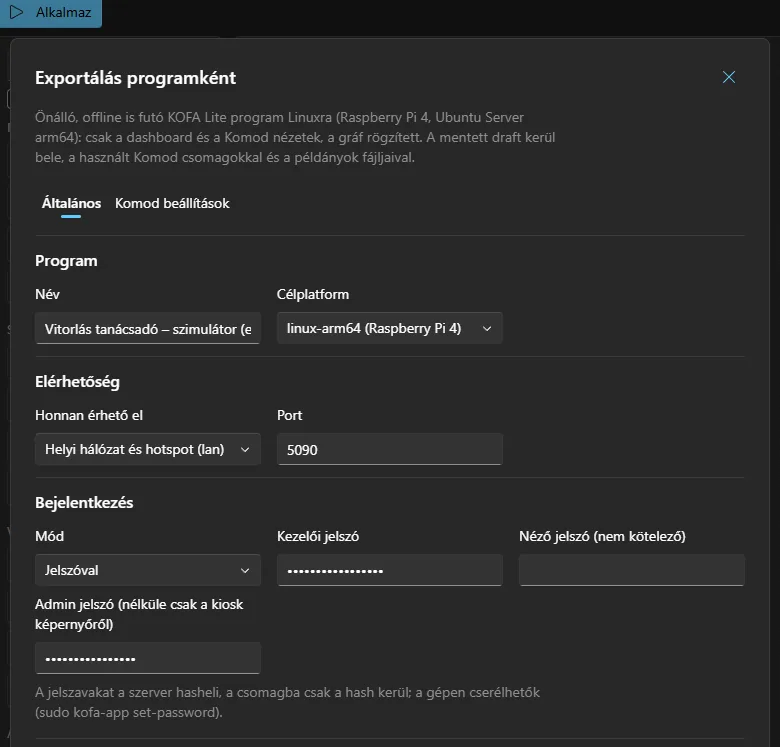
| Setting | Meaning |
|---|---|
| Név (Name) | The program's name; shown in the file name and the Lite header. Defaults to the profile's name. |
| Célplatform (Target platform) | linux-arm64 (Raspberry Pi 4, Ubuntu Server). linux-x64 too in developer mode. |
| Honnan érhető el (Reachable from) | Only on the machine (local): reached by the kiosk browser and the Bluetooth tunnel. Local network and hotspot (lan): from the network as well. Relay (relay): connects outward to a KOFA relay and is reachable with central accounts; password sign-in is mandatory. |
| Port | 5090 by default. |
| Bejelentkezés (Sign-in) | None: everyone is an operator. Password: operator password (required), viewer password (optional: view only), admin password. |
The roles:
| Role | What it can do |
|---|---|
| Viewer | view the dashboard |
| Operator | control, widget settings (if the export allows it) |
| Admin | network, Bluetooth, switching the kiosk off, changing passwords, updating, powering the machine off |
Important
The server hashes the passwords; only the hash goes into the package. They can be changed on the machine later: sudo kofa-app set-password operator|viewer|admin, or in the interface as admin. If there is no admin password, the kiosk screen gives whoever stands in front of the machine admin rights.
Warning
Network (lan) access without sign-in, or a hotspot without a password, can only be exported with explicit confirmation (the I understand the risk… checkbox). In lan mode a remote browser does not treat the page opened over HTTP as a secure context, so browser Bluetooth and geolocation do not work there; the kiosk browser uses localhost, where everything works.
Kiosk mode, network and Bluetooth
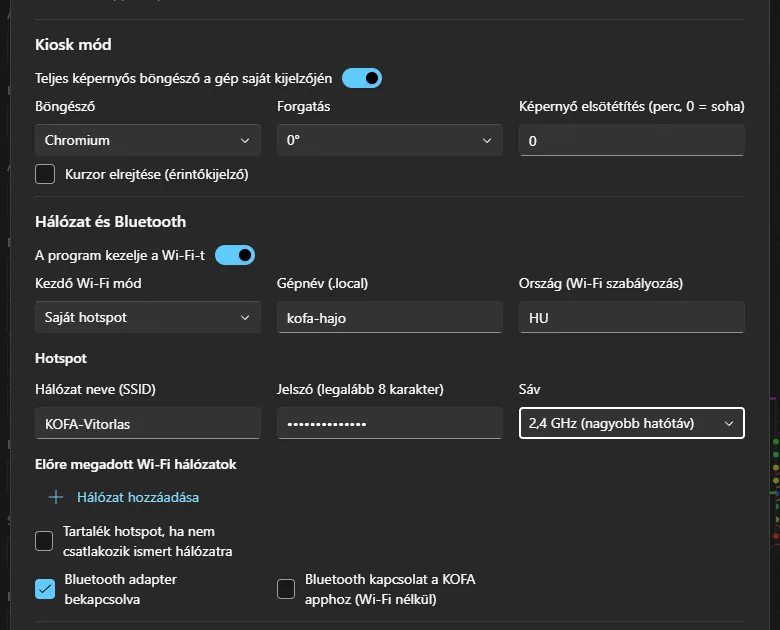
Kiosk mode: when on, a full-screen browser with the Lite interface opens on the machine's own display (HDMI or touch screen) at start-up, and it cannot be exited (no address bar, no developer tools, no console switching). You can set the browser (Chromium or the lighter cog), screen rotation (0/90/180/270°), screen blanking (minutes, 0 = never) and hiding the cursor for touch screens. Exiting is for admins: from the interface (Kiosk kikapcsolása) or over SSH (sudo kofa-app kiosk off).
Network and Bluetooth:
| Setting | Meaning |
|---|---|
| The program manages Wi-Fi | When off, the installer leaves the network alone and the Network page is read-only. |
| Initial Wi-Fi mode | Own hotspot (the machine shares Wi-Fi), Connect to another network (client), or No change. |
| Host name | The interface is also reachable at http://<hostname>.local:<port> (mDNS). |
| Country | Wi-Fi regulatory domain (HU by default; required for a 5 GHz hotspot). |
| Hotspot | Network name (SSID), password (WPA2, at least 8 characters), band (2.4 GHz: longer range; 5 GHz). |
| Preset Wi-Fi networks | For example the marina's or the workshop's Wi-Fi (SSID, password, priority). |
| Fallback hotspot | If, in client mode, the machine does not connect to a known network within a set time, it starts a hotspot by itself so it always stays reachable. |
| Bluetooth adapter on | The adapter's initial state. |
| Bluetooth connection for the KOFA app | The Bluetooth connection extension goes into the package, so the native app can connect without Wi-Fi. |
Note
A hotspot only makes sense in lan mode (otherwise devices that join could not reach the interface): the exporter reports this as an error.
Other settings and preview
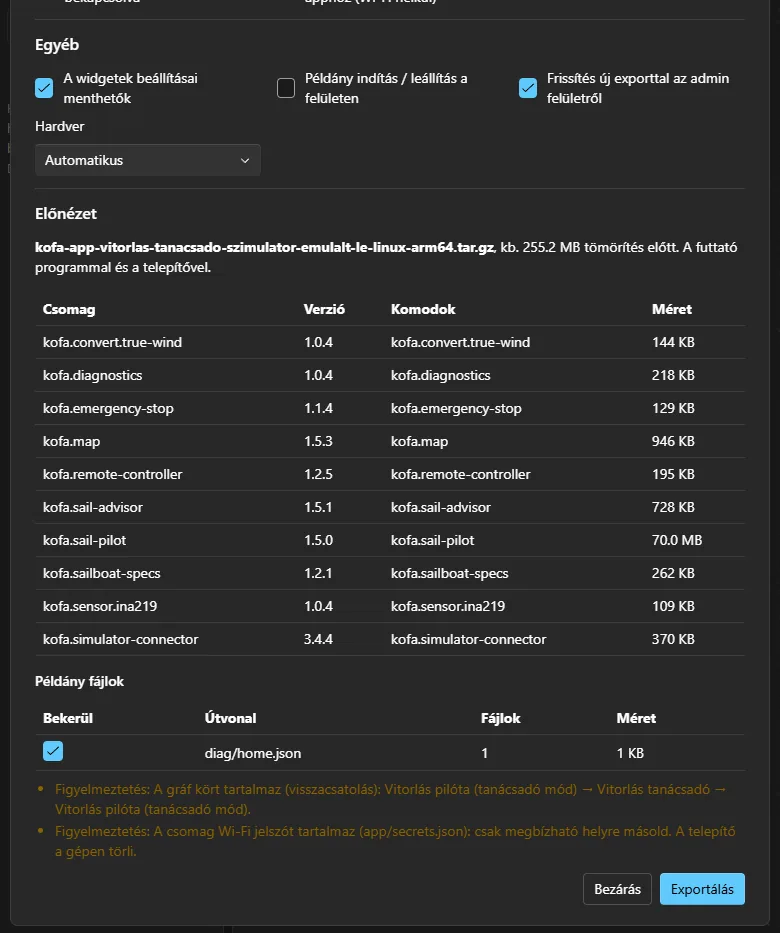
| Setting | Meaning |
|---|---|
| Widget settings can be saved | When off, the program is read-only: widget settings cannot be saved. |
| Starting / stopping instances in the interface | Whether the start / stop / restart controls of instances are shown. |
| Update with a new export from the admin interface | A newer export can be uploaded on the Administration page and the machine installs it itself (the previous one is restored on failure). When off, it can only be updated over SSH. |
| Hardware | Automatic (default), Linux (real), Simulated (for demos). |
The Preview shows, before you download, what goes into the package:
- the file name and the estimated size (before compression),
- the list of packages with version, the Komods in them and size,
- the instance files (models, routes): they can be excluded per folder, for example a recorder's gigabyte-sized recordings,
- the errors (these block the export) and warnings.
The Komod beállítások tab (only if the package has such a Komod) shows the Komods' deployment settings, for example the Bluetooth name or the simulator connector's addresses; these are written over the instances' own settings.
The Exportálás (Export) button downloads a kofa-app-<name>-linux-arm64.tar.gz file.
Common export errors
| Message | What to do |
|---|---|
| In password mode the operator password is required. | Enter the operator password, or choose the None mode. |
| The runtime template … was built from an older KOFA than the … package | Rebuild the template: tools/build-lite.sh linux-arm64. |
| There is no linux-arm64 runtime template | The server looks for the template in the Kofa:Export:TemplateDirectories folders, and otherwise downloads the one for its own version from the internet. On an offline server, unpack the kofa-lite-<version>-linux-arm64.tar.gz release file into the folder. |
| Network access without sign-in … only with confirmation | Set a password or tick the risk acceptance. |
| The graph contains a cycle (feedback) | A warning: nothing to do if the feedback is intentional. |
| The package contains a Wi-Fi password | A warning: app/secrets.json contains passwords, copy the package only to trusted places; the installer deletes it on the machine. |
Exporting from the command line
You can use the same service without the server (in CI, in scripts):
dotnet run --project tools/Kofa.Export -- \
  --graph examples/graphs/vitorlas-tanacsado-szimulator.kofa-graph.json \
  --packages artifacts/komods \
  --template artifacts/lite \
  --options options.json \
  -o ./out
The --options file holds the dialog's settings in JSON, for example:
{
  "name": "Vitorlas tanacsado",
  "rid": "linux-arm64",
  "access": { "mode": "lan", "port": 5090 },
  "auth": { "mode": "password", "operatorPassword": "…", "adminPassword": "…" },
  "hardwareBackend": "auto",
  "instanceControl": true
}
The --preview switch only prints the preview, without a file. The runtime template is built by tools/build-lite.sh (artifacts/lite/<rid>/); in a release it is the kofa-lite-<version>-<rid>.tar.gz file.
What is in the exported package
kofa-app-<name>/
  install.sh, uninstall.sh   installer and uninstaller
  bin/                       the Kofa.Lite program and client, the kofa-app helper
  app/                       app.json, graph.json, dashboard.json, komods/, instances/
  system/                    systemd units, polkit rules, browser policy
  OLVASS-EL.txt              short instructions for this export
Installing on the target machine
The target machine is a fresh Ubuntu Server 24.04 arm64 on a Raspberry Pi 4 (with SSH). The program is self-contained: no .NET is needed on the machine.
scp kofa-app-vitorlas-linux-arm64.tar.gz ubuntu@<machine>.local:/tmp/
ssh ubuntu@<machine>.local
cd /tmp && tar xzf kofa-app-vitorlas-linux-arm64.tar.gz
cd kofa-app-vitorlas
sudo ./install.sh
The installer, in order:
- checks the machine (root,
aarch64, systemd, Ubuntu, free space) and the package (format, platform, SHA-256); - stops and disables the full KOFA if it runs on the same machine (they would claim the same hardware); when replacing another program it asks first and backs up the old data under
backup-<date>; - installs the missing system packages, only those the settings need: BlueZ (Bluetooth), NetworkManager +
dnsmasq-base+avahi-daemon+iw(network),cage+ a browser (kiosk),libusbfor USB Komods; enables I2C if the graph has a hardware Komod; - creates the
kofa-appsystem user (andkofa-kioskfor the kiosk); - copies the program to
/opt/kofa-app, processes the secrets (Wi-Fi passwords) and creates the machine settings file/etc/kofa-app/local.json; - sets up the network (hotspot / client) and installs the
kofa-app.serviceunit, and thekofa-kiosk.serviceunit for the kiosk; - starts the program, waits for it to respond and prints a summary: the interface addresses (IP,
<hostname>.local, and for a hotspot the SSID and10.42.0.1), the kiosk state and where to change passwords.
Note
The system packages need internet once at install time, if they are not yet installed. Without internet the installer lists the missing ones and installs the part that works without them (no kiosk and no network management). Fully offline install: on an internet-connected Ubuntu machine (same architecture) sudo ./install.sh --fetch-packages downloads the needed packages into the packages/ folder; copy the folder to the target and sudo ./install.sh installs without internet.
Installer options
They override what was chosen at export time:
| Option | Meaning |
|---|---|
--kiosk / --no-kiosk |
switch the kiosk on or off |
--no-network |
leave the network alone |
--no-bluetooth |
skip the Bluetooth step |
--port <n> |
the port |
--hostname <name> |
the machine's name |
--wifi-interface <if> |
another Wi-Fi device (default wlan0) |
--yes |
do not ask questions |
--offline |
do not try to install packages, only check |
--fetch-packages |
only download the packages needed for an offline install |
Re-running is an update: the program is replaced, while /var/lib/kofa-app (data) and /etc/kofa-app (machine settings) are kept.
With one command from the development machine
tools/deploy-lite.sh --host 192.168.2.224 --user kofa-hw1 --key ~/.ssh/KOFA-HW1 \
    --app ~/Downloads/kofa-app-vitorlas-linux-arm64.tar.gz [--remove-full] [-- --no-kiosk --port 5090]
The script unpacks the export, completes it with the runtime template, uploads it and runs sudo ./install.sh --yes on the target (it asks for the sudo password in the terminal). --remove-full deletes the full KOFA from the machine after a successful install. Options after -- go to install.sh. For several machines, use the same package with a different --host.
Where everything is after installation
| Location | Contents |
|---|---|
/opt/kofa-app/ |
bin/, app/, system/ (replaced on reinstall) |
/var/lib/kofa-app/ |
writable data: instance files, settings, network.json, keys, update/ |
/etc/kofa-app/local.json |
per-machine overrides (port, access, password hashes, kiosk on/off) |
journalctl -u kofa-app |
logs |
The Lite interface
Open http://<machine>:5090 (or http://<hostname>.local:5090, on the hotspot http://10.42.0.1:5090); in kiosk mode it appears on the machine's display by itself.
Sign-in
In password mode the pages ask for the operator password. For admin functions, Belépés adminként (Sign in as admin) in the menu takes you to the admin password page.
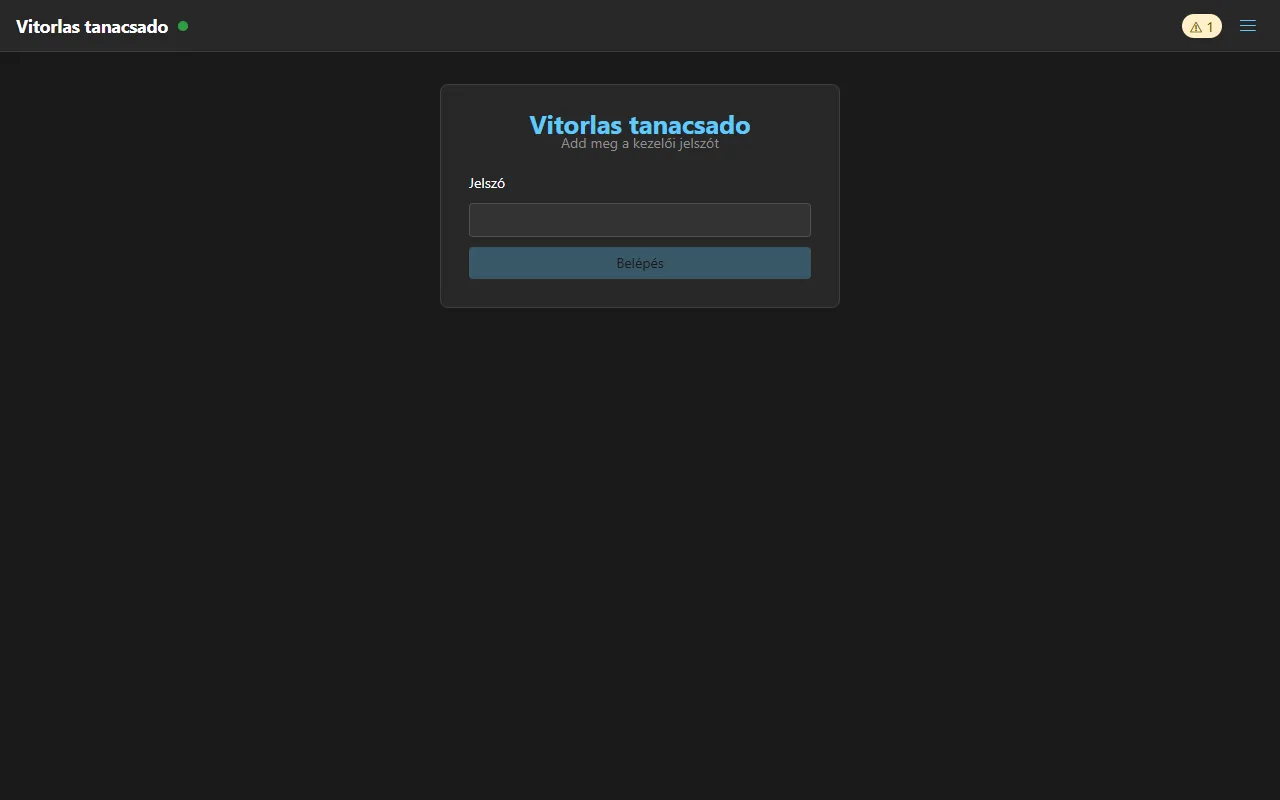
Dashboard
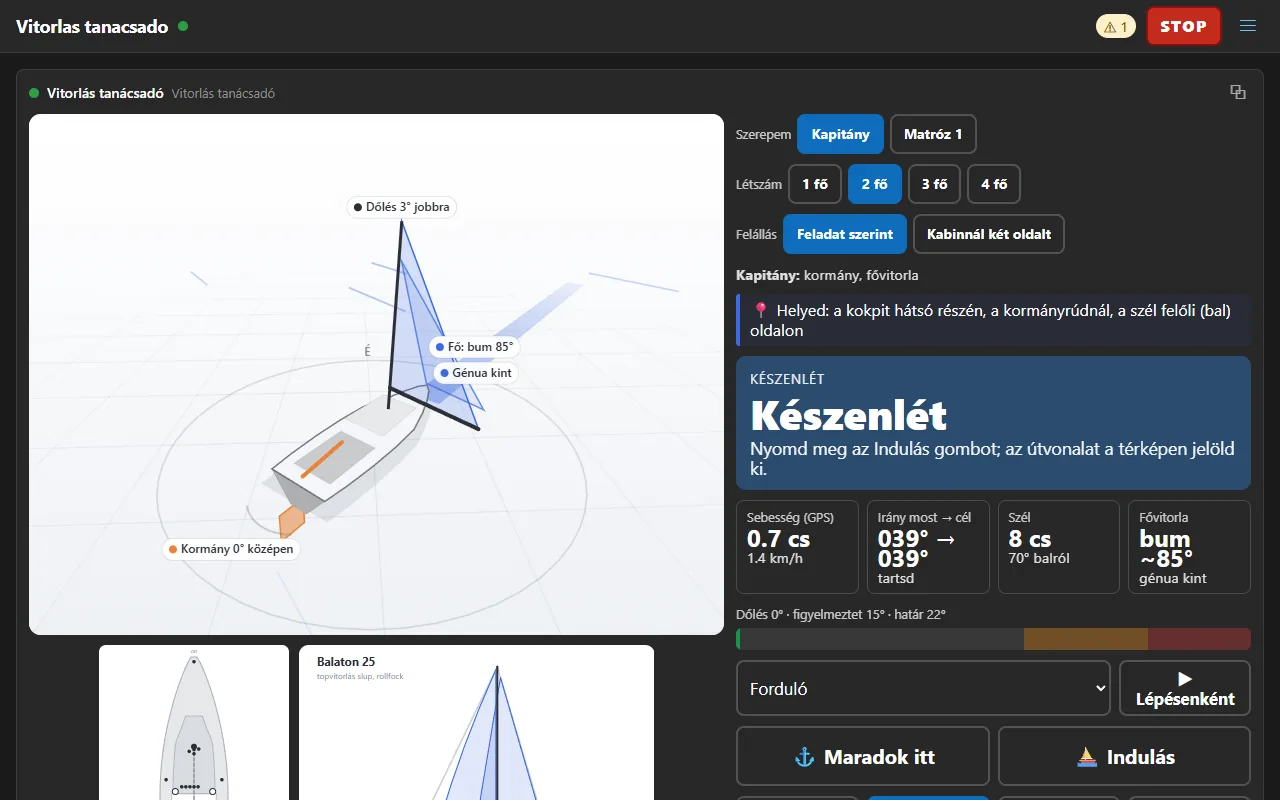
The fixed dashboard with the graph's Komod views. The header always has the red STOP (emergency stop), the warning badge (it leads to the Status page) and the menu.
Status
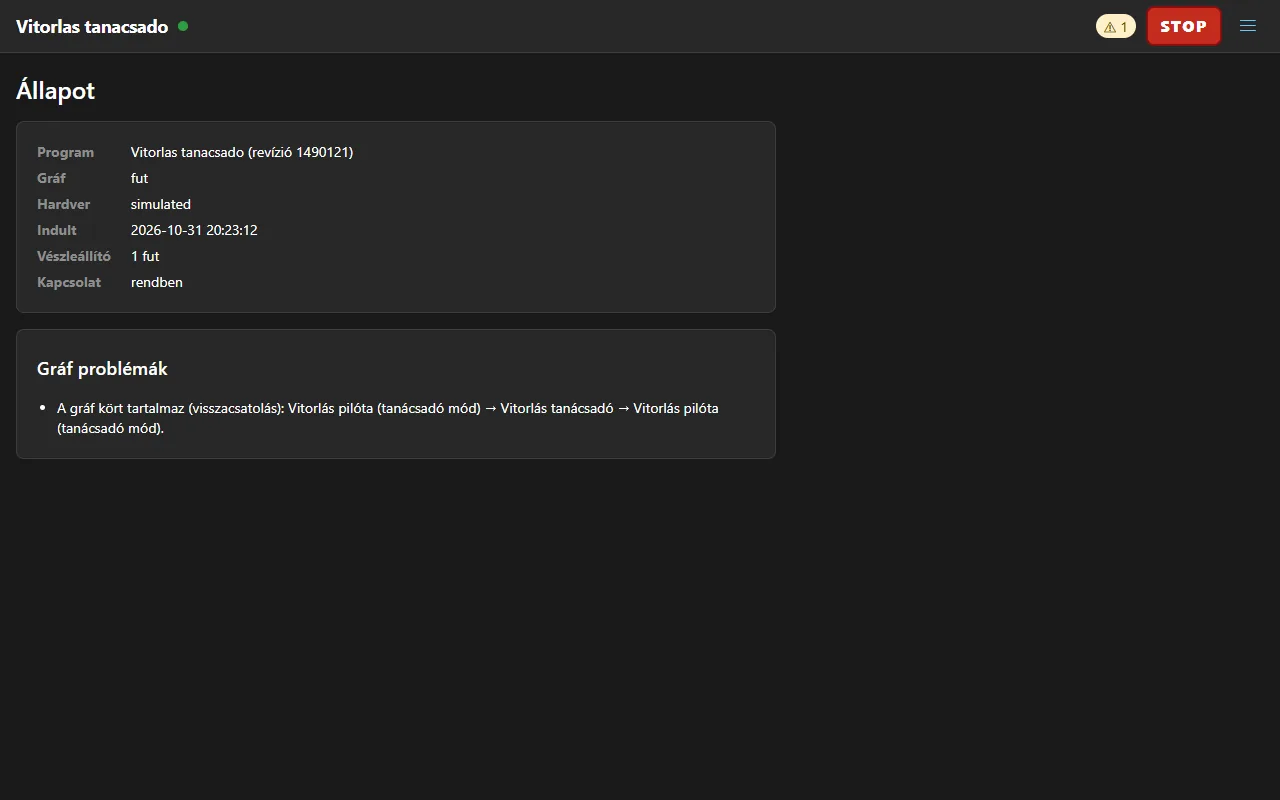
The Állapot (Status) page shows the program name and revision, the graph state, the hardware backend, the start time, the number of emergency stops, the connection and the graph's problems.
Network
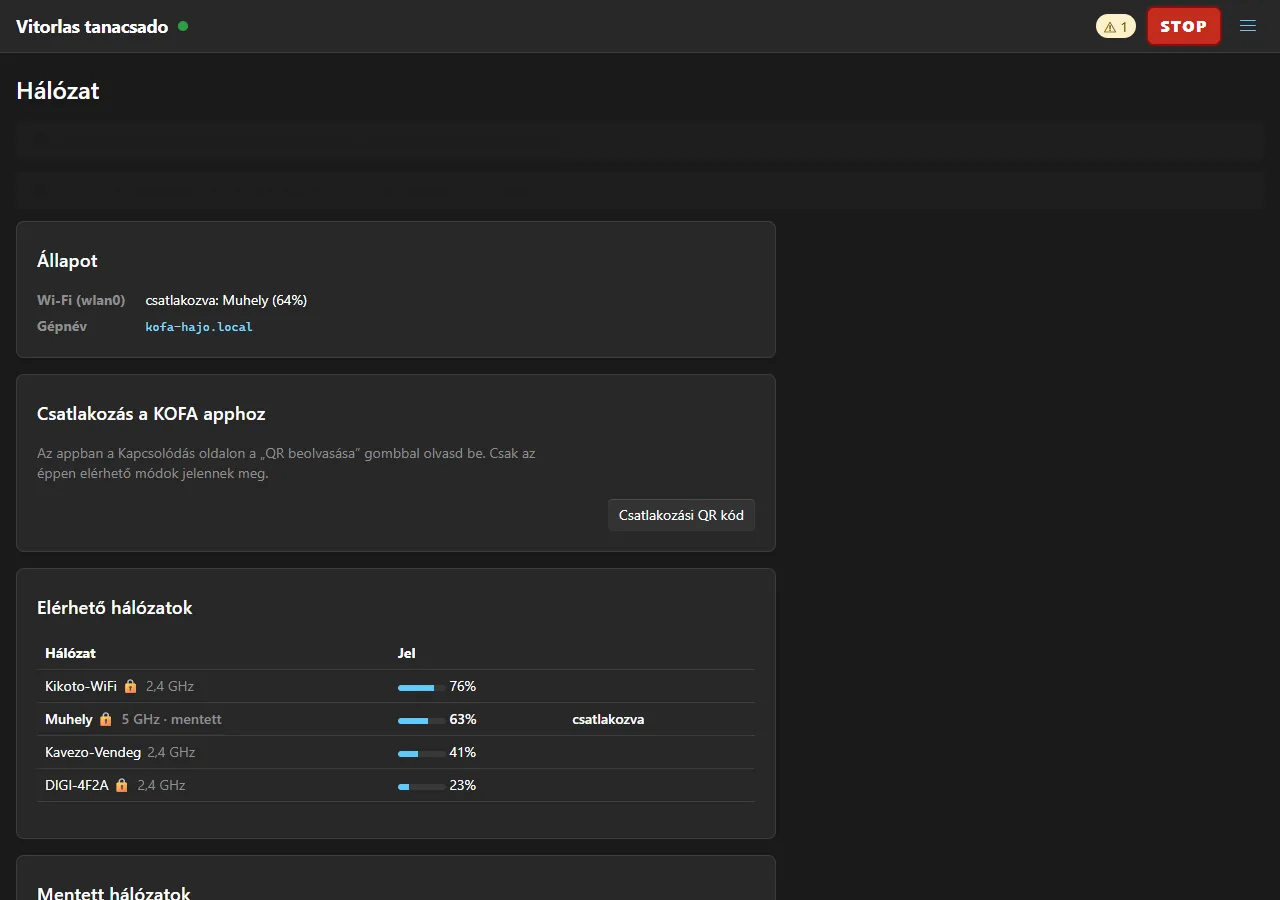
The Hálózat (Network) page (admin) is the same as in the full KOFA: Wi-Fi status, connecting, own hotspot, fallback hotspot, Bluetooth and the connection QR code for the KOFA app. Whatever could break the connection starts in trial mode: if you do not confirm within 2 minutes, the previous setting is restored.
Administration
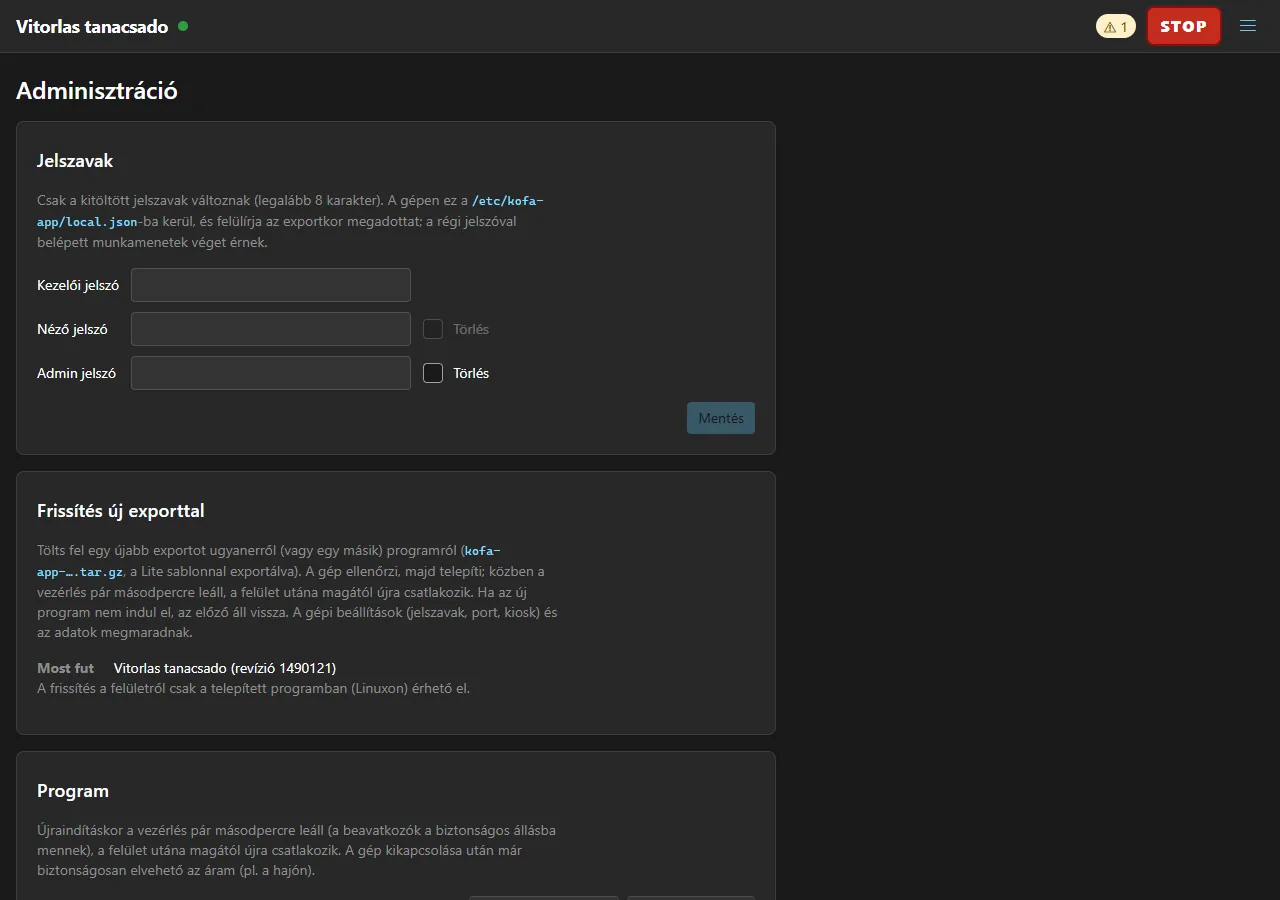
On the Adminisztráció (Administration) page (admin) you change passwords, upload a newer export (Frissítés új exporttal), restart the program and power the machine off (so on a boat the power can be removed safely). In relay mode the pairing code is shown here too.
Managing the machine over SSH: kofa-app
After installation the kofa-app command always lets you manage the program on the machine, even if the interface is unreachable.
| Command | What it does |
|---|---|
kofa-app status / logs / restart |
state, log, restart |
sudo kofa-app set-password operator\|viewer\|admin |
change a password (--clear: remove) |
sudo kofa-app port <n>\|default |
change the port |
sudo kofa-app access local\|lan\|relay\|default |
change the access mode |
sudo kofa-app kiosk on\|off |
switch the kiosk on or off |
kofa-app network status / hotspot / client <ssid> / reset |
manage the network |
sudo kofa-app relay [on\|off\|default\|url <address>\|reset] |
relay pairing code; switch the machine's own relay link on / off in any access mode (also on the admin page), change the address |
kofa-app measure [--restart] [sec] |
measure start-up times |
sudo kofa-app uninstall |
uninstall |
Uninstalling: sudo ./uninstall.sh (or sudo kofa-app uninstall) stops and removes the services and /opt/kofa-app; --purge also removes the data and machine settings. It does not touch the network settings.
Updating
Two ways:
- From the interface (if the export allowed it): Adminisztráció → Frissítés új exporttal: upload a newer
kofa-app-….tar.gzexport. The machine checks it, installs it as root and restarts the program. If the new program does not start, the previous one is restored; the Administration page shows the result (succeeded,rolled-back,failed) and the installer's log. Passwords, kiosk, port and data are kept. - Over SSH:
sudo ./install.shfrom the new package, ortools/deploy-lite.sh.
Troubleshooting
| Symptom | What to do |
|---|---|
| The interface does not open from another machine | The access mode may be local: sudo kofa-app access lan. Check the hotspot and the port (kofa-app status). |
| The program was built for … platform, this machine is … | You exported for another target platform. Export again for the right one (linux-arm64). |
| The kiosk screen is black | No display is connected (cage exits and systemd retries after 2 s), or the program has not started yet: kofa-app status, journalctl -u kofa-kiosk. |
| Forgotten password | Over SSH: sudo kofa-app set-password admin. |
| The installer reports missing packages | Internet is needed once at install time, or use offline packaging (--fetch-packages). |
| Wi-Fi SSH drops during install | The network step runs at the end as a transient systemd unit, so it completes anyway; reconnect after a few seconds. |
| I cannot reach the machine after the hotspot | In hotspot mode the machine's address is 10.42.0.1. Trial mode restores the previous network after 2 minutes if you did not confirm. |
More: Installing KOFA and first-time setup, Troubleshooting.